On a laptop, the YOLO version is the smallest factor in how fast it runs
Ultralytics released YOLO26 this year, and the obvious question for anyone running detection on their own hardware is whether to switch from YOLO11. So I benchmarked both, at three sizes (n, s, m), on a single laptop (i7-13650HX, RTX 4060) across eight runtimes.
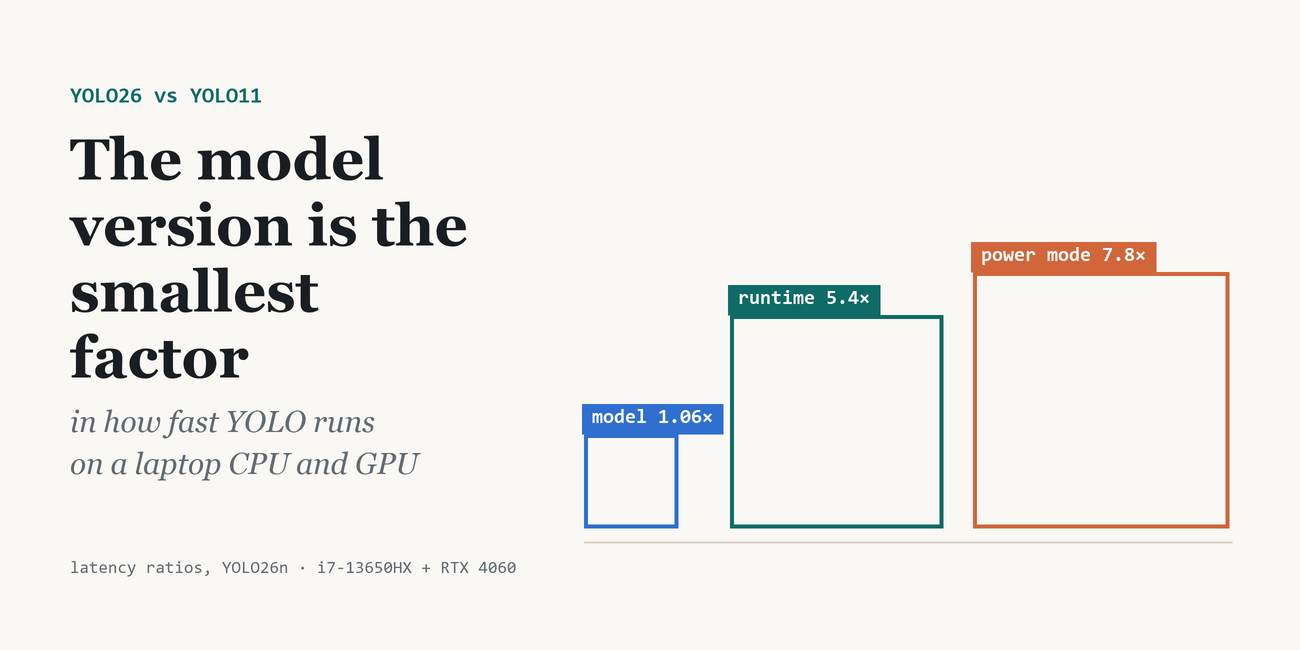
The answer to the question I asked turned out to be the least interesting part. On a laptop, which YOLO version you run is the smallest factor in how fast it runs.
The short version (YOLO26n, the same laptop throughout):
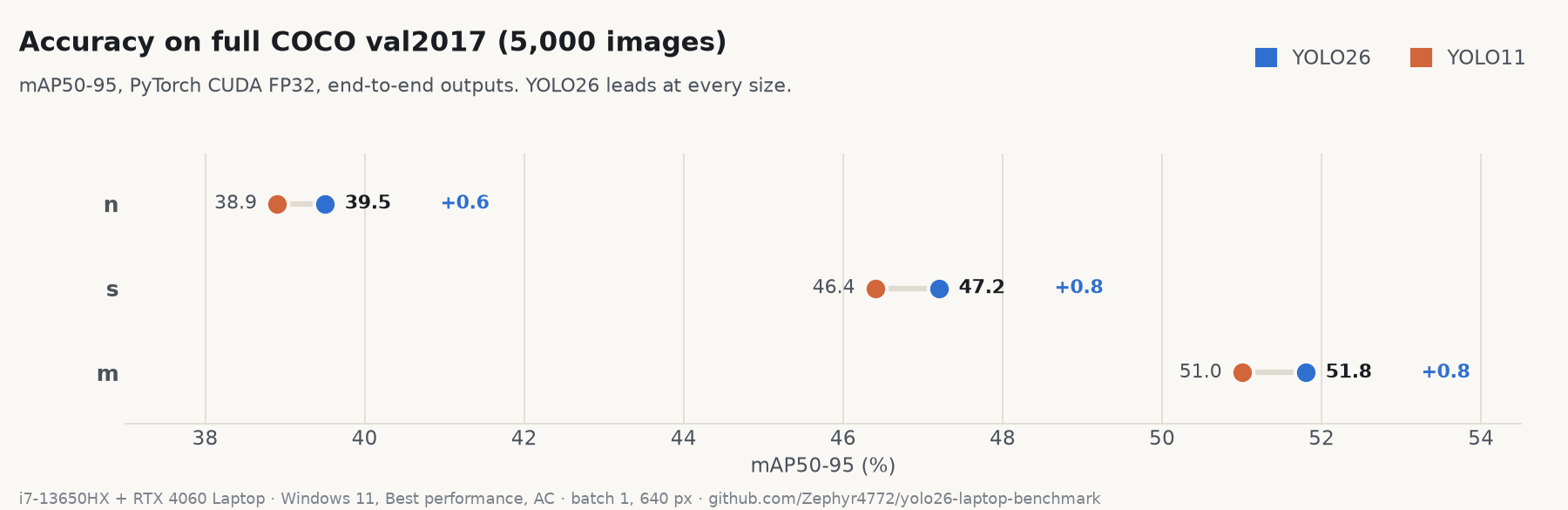
- The model version changes latency by about 5%. YOLO26 and YOLO11 are within ±25% on every runtime and mostly within ±5%. YOLO26 is +0.6 to +0.8 mAP more accurate.
- The runtime changes it by 5.4× on the CPU, from 52.7 ms in PyTorch to 9.8 ms in OpenVINO INT8, for about one point of mAP.
- Windows’ power mode changes it by up to 7.8×. In Best power efficiency, Windows quietly moves the process to slower cores a few seconds after it starts.
- That last effect nearly made me publish that YOLO26 is “50–90% faster” than YOLO11 on the CPU. It isn’t.
The setup
- Laptop: Intel i7-13650HX (6 performance cores + 8 efficiency cores), RTX 4060 Laptop GPU, Windows 11, plugged in.
- Models: YOLO26 and YOLO11, sizes n, s and m, batch 1 at 640 px.
- Runtimes:
- CPU: PyTorch, ONNX Runtime, OpenVINO FP32, OpenVINO INT8
- GPU: PyTorch CUDA FP32 and FP16, TensorRT FP32 and FP16
- Accuracy: the full COCO val2017 set (5,000 images), mAP50-95.
- Latency: inference time per image, the median of 3 rounds of 50 images, with the two models interleaved round by round (why that matters is the story below).
Accuracy: YOLO26 wins by a little
| n | s | m | |
|---|---|---|---|
| YOLO26 | 39.5 | 47.2 | 51.8 |
| YOLO11 | 38.9 | 46.4 | 51.0 |
| YOLO26 lead | +0.6 | +0.8 | +0.8 |
These reproduce the YOLO26 model card to within 0.6–0.7 mAP; the small gap is consistent with the evaluation settings.
The lead survives quantisation. I calibrated OpenVINO INT8 on 500 validation images and scored it on the other 4,500, which it never saw. YOLO26 stays ahead by +0.6 (n), +0.5 (s) and +0.7 (m). INT8 costs YOLO26 a little more than YOLO11 (0.9–1.4 points vs 0.5–0.8).
Speed: a tie
| runtime | 26n | 11n | 26s | 11s | 26m | 11m |
|---|---|---|---|---|---|---|
| PyTorch CPU | 52.7 | 49.8 | 95.2 | 92.3 | 200.8 | 198.3 |
| ONNX CPU | 16.7 | 20.8 | 46.0 | 48.5 | 131.0 | 133.7 |
| OpenVINO FP32 CPU | 20.1 | 24.9 | 58.8 | 58.6 | 171.6 | 168.8 |
| OpenVINO INT8 CPU | 9.8 | 10.6 | 21.8 | 21.6 | 53.8 | 53.6 |
| PyTorch CUDA FP16 | 9.4 | 7.7 | 10.8 | 8.8 | 17.0 | 16.5 |
| TensorRT FP16 | 3.4 | 3.5 | 5.2 | 4.7 | 6.9 | 5.8 |
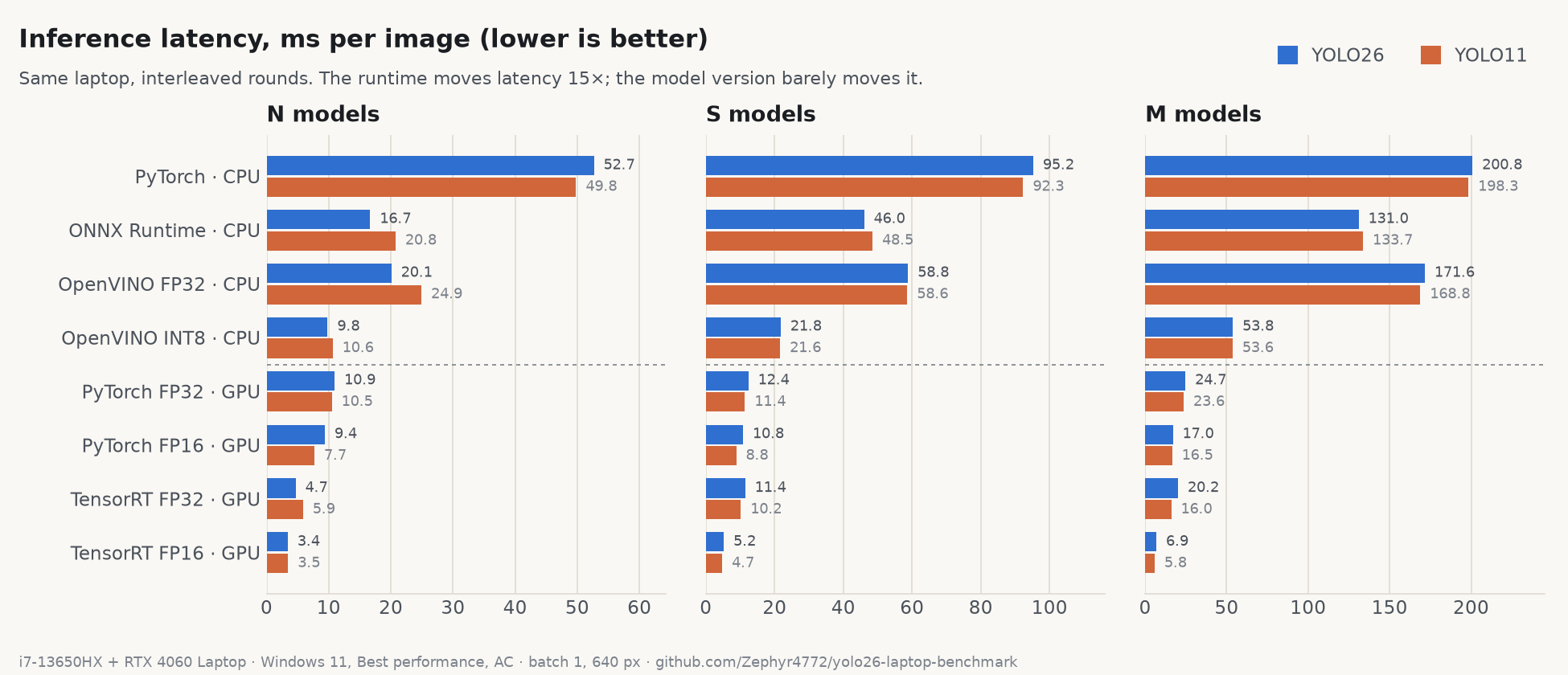
(ms per image; full table with all eight runtimes in the repo.)
YOLO26n is about 20% faster on ONNX and OpenVINO FP32. On the GPU, YOLO11 is equal or up to about 20% faster. Everywhere else they’re within a few percent. If you’re choosing between them, choose on accuracy: YOLO26 is slightly better at about the same cost.
The runtime matters far more
Same model, same laptop, same image size. On the CPU, YOLO26n goes from 52.7 ms in PyTorch to 9.8 ms in OpenVINO INT8: 5.4× faster, about 70 FPS end to end, for roughly one point of mAP. Across CPU and GPU, the fastest runtime (TensorRT FP16, 3.4 ms) is 15× faster than the slowest.
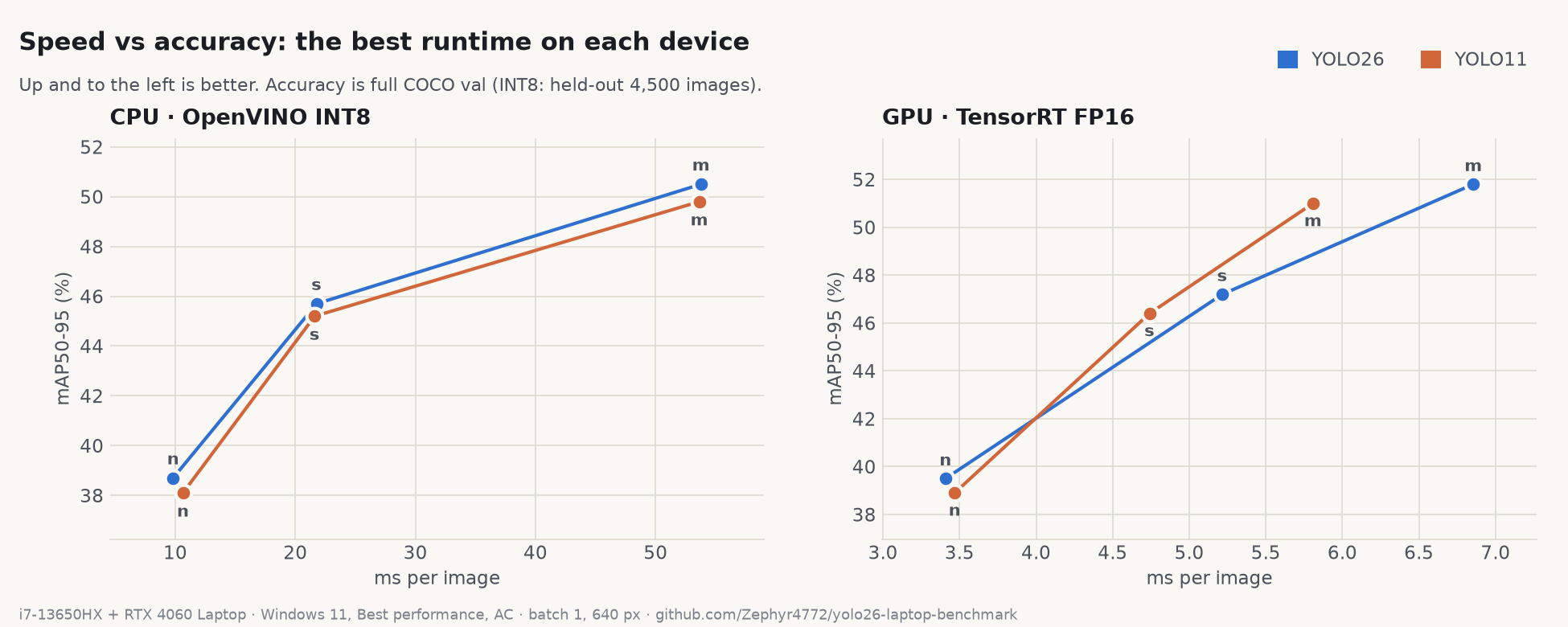
If you deploy on a CPU and you’re still running the PyTorch model directly, exporting to OpenVINO (or ONNX) is worth far more than any model upgrade.
Windows’ power mode matters most
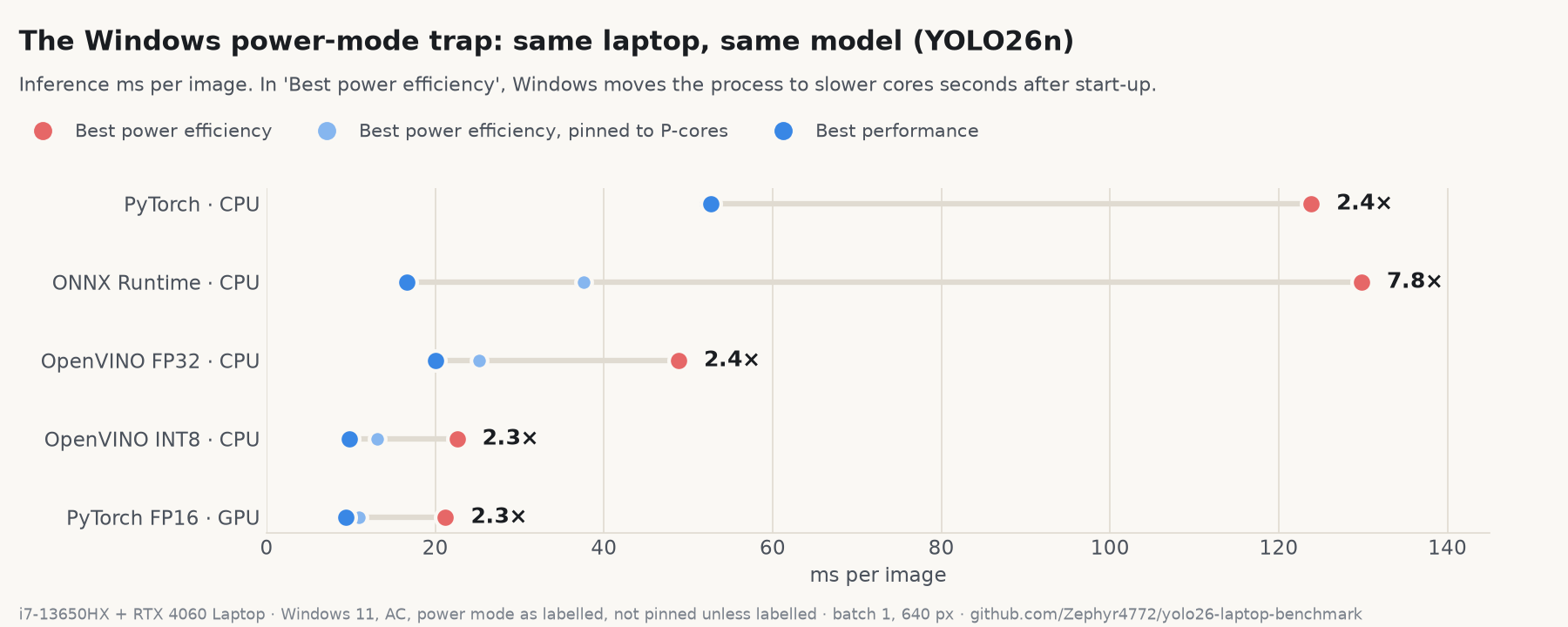
| runtime (YOLO26n, ms) | Best power efficiency | + pinned to P-cores | Best performance |
|---|---|---|---|
| PyTorch CPU | 123.8 | 52.1 | 52.7 |
| ONNX CPU | 129.8 | 37.6 | 16.7 |
| OpenVINO FP32 | 48.9 | 25.2 | 20.1 |
| OpenVINO INT8 | 22.6 | 13.2 | 9.8 |
| CUDA FP16 | 21.2 | 10.9 | 9.4 |
On a hybrid Intel CPU in Best power efficiency mode, a freshly started process runs fast. A few seconds later, Windows moves it to slower cores and lower clocks. Every runtime got 2.3–7.8× slower, including the GPU runs, because the CPU-side work in each call slows down too.
A few details that surprised me:
- It isn’t caused by the ML libraries. A 10-second pure-Python script reproduces it: 2.2–3.6× slower after three seconds, even if the process mostly sleeps.
- Pinning to the performance cores helps but doesn’t fix it, because those cores clock down in this mode too.
- You may not have chosen the mode. On this laptop, Windows’ Energy Saver was forcing it: the Settings page said “Power mode cannot be set when energy saver is on”.
Switching to Best performance removes the effect (the same script shows 1.02×).
How I almost published the wrong headline (twice)
My first run timed the models one after another: all YOLO26 runtimes, then all YOLO11. It showed YOLO26 50–90% faster on the CPU. That would have been the headline.
It was the power mode. YOLO26 happened to run while the process was still on the fast cores; by the time YOLO11 ran, Windows had demoted it. When I re-timed the models interleaved, round by round, so both saw the same conditions, the gap disappeared.
The second near-miss was accuracy. A quick 500-image subset showed YOLO26n ahead by +1.7 to +2.1 mAP. The full 5,000 images say +0.6. Small validation sets exaggerate small differences.
Takeaways
- YOLO26 vs YOLO11: same speed, slightly better accuracy. Switch if +0.6–0.8 mAP matters to you; don’t switch expecting it to be faster.
- On a CPU, export the model. OpenVINO INT8 is 5.4× faster than PyTorch for about one point of mAP.
- Before benchmarking anything on a Windows laptop: plug in, set Best performance (turn off Energy Saver if it’s forcing the mode), interleave the things you’re comparing, and use the full validation set. Otherwise you may be measuring Windows, not the model.
Caveats: this is one laptop. Latency is the median of 3 interleaved rounds of 50 images, and the worst round-to-round spread was 1.6×. TensorRT times include copying each image to the GPU. If you have a hybrid Intel laptop, run ecore_repro.py from the repo and post your numbers in the Hugging Face discussion.
Code, raw results and the repro script: yolo26-laptop-benchmark