/ ARTICLE
In the YOLO26 benchmark I found that on a laptop, the runtime and Windows’ power mode matter far more than the YOLO version. This post is about another factor I didn’t expect: the packages Ultralytics installs for you.
When a feature needs a package you don’t have, Ultralytics installs it on the spot. You call model.export(format="onnx") or YOLO("model.onnx").predict(), it notices onnxruntime is missing, and it runs pip (or uv) from inside your process. This is called AutoUpdate, and it’s on by default. It’s convenient, and most of the time it works.
Twice, on the same laptop as the benchmark (i7-13650HX, RTX 4060, Windows 11), it didn’t. Both times the cause was the same: the installer picked the newest package, not one that works with the CUDA build of PyTorch I had. I fixed both in Ultralytics, and both fixes are merged.
The short version:
- Quiet: ONNX models ran on the CPU. Since version 1.27, the
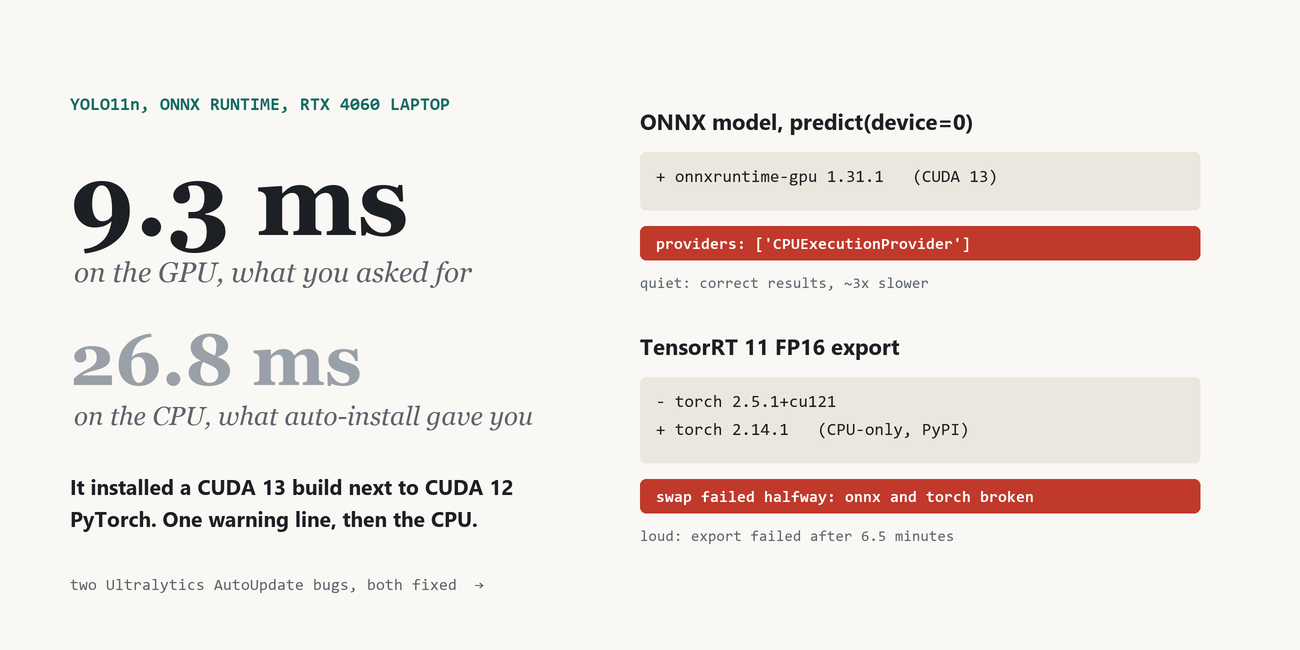
onnxruntime-gpuwheels on PyPI are built for CUDA 13. Most PyTorch installs are still CUDA 12. AutoUpdate installed the latest wheel, it couldn’t use the GPU, and every ONNX prediction ran on the CPU instead. The only sign was one warning line. On this laptop that’s 26.8 ms instead of 9.3 ms per image for YOLO11n, about 3x slower. - Loud and destructive: a TensorRT export broke PyTorch. On TensorRT 11, an FP16 engine export auto-installs NVIDIA’s ModelOpt, which needs PyTorch 2.8 or newer. With an older CUDA PyTorch, the resolver decided to replace it with a CPU-only PyTorch wheel from PyPI, and tried to do so while the export was running. The swap failed halfway, left
onnxandtorchbroken, and the export failed anyway, after 6.5 minutes. - The fix in both cases was to tell the installer what it must not change: cap
onnxruntime-gpubelow 1.27 when PyTorch is on CUDA 12, and pin the installed PyTorch version during the ModelOpt install.
How AutoUpdate works
Ultralytics checks requirements at the point of use. check_requirements("onnxruntime-gpu[cuda]") looks for the package, and if it’s missing (and YOLO_AUTOINSTALL isn’t set to false), it installs it:
requirements: Ultralytics requirement ['onnxruntime-gpu[cuda]'] not found, attempting AutoUpdate...
The installer only sees the requirement string. It doesn’t know that your torch came from PyTorch’s own CUDA 12 index rather than from PyPI, or which CUDA version the rest of your GPU stack needs. Unless the requirement says otherwise, it picks the newest version that resolves. Both bugs come from that gap.
Quiet failure: ONNX on the CPU, with one warning
ONNX Runtime ships its CUDA support as onnxruntime-gpu. Up to 1.26 the PyPI wheels were built for CUDA 12. From 1.27 they’re built for CUDA 13. A CUDA 13 build can’t load the CUDA 12 libraries that a cu126/cu128 PyTorch brings, so ONNX Runtime quietly drops its CUDA provider and keeps only the CPU.
Ultralytics already handled a missing CUDA provider gracefully: since an earlier fix, it falls back to the CPU instead of crashing. So with a CUDA 12 PyTorch, this is what you got:
requirements: Ultralytics requirement ['onnxruntime-gpu[cuda]'] not found, attempting AutoUpdate...
WARNING CUDA requested but CUDAExecutionProvider not available. Using CPU...
Then everything runs, every prediction is correct, and it’s on the CPU. Export yolo11n.pt to ONNX and run predict(device=0), with torch 2.11.0+cu128:
onnxruntime-gpu that AutoUpdate installed |
what ONNX Runtime used | |
|---|---|---|
| before the fix | 1.31.1 (CUDA 13) | ['CPUExecutionProvider'] |
| after the fix | 1.26.0 (CUDA 12) | ['CUDAExecutionProvider', 'CPUExecutionProvider'] |
What it costs, YOLO11n through ONNX Runtime at 640x640, batch 1, median of 3 rounds of 50 runs with the two providers interleaved:
| ONNX Runtime provider | ms per image |
|---|---|
| CUDA (what you asked for) | 9.3 |
| CPU (what you got) | 26.8 |
If you watch the log, you see the warning. If you’re running a server, a batch job or a notebook cell you didn’t scroll, you see a model that’s about 3x slower than it should be, and it’s easy to blame the model, the laptop or the power mode instead.
The fix adds one constant next to the existing ONNX Runtime build list: onnxruntime-gpu[cuda]<1.27 when torch.version.cuda is 12.x, and uncapped otherwise. ARM64 stays uncapped, because PyPI has no aarch64 onnxruntime-gpu wheels before 1.27, so a cap would break Jetson. An existing GPU build is never replaced. If you already have a CUDA 13 build next to a CUDA 12 PyTorch, the warning now tells you what to install:
WARNING CUDA requested but CUDAExecutionProvider not available. Using CPU... Try 'pip install "onnxruntime-gpu[cuda]<1.27"'.
The maintainers improved the PR before merging. One reviewer asked me to show that hint only for this exact version mismatch, so custom builds keep the generic warning. Glenn Jocher then cut my helper function down to a single constant. The merged change is six lines: ultralytics#27175.
Loud failure: a TensorRT export that replaced PyTorch
The second one wasn’t quiet at all.
On TensorRT 11, model.export(format="engine", half=True) quantizes through NVIDIA’s ModelOpt, so it runs check_requirements("nvidia-modelopt[onnx]>=0.44"). ModelOpt 0.44 requires torch>=2.8. I had torch 2.5.1+cu121 from PyTorch’s CUDA index.
The resolver’s answer was to “upgrade” PyTorch. It prepared 21 packages, including a 118 MB torch wheel from PyPI, which on Windows is a CPU-only build. Then it tried to swap them in, while the export process was running with onnx already imported:
requirements: Ultralytics requirement ['nvidia-modelopt[onnx]>=0.44'] not found, attempting AutoUpdate...
Resolved 51 packages in 3.54s
Prepared 21 packages in 3m 11s
warning: Failed to uninstall package at ...\torch-2.5.1+cu121.dist-info due to missing `RECORD` file.
error: failed to remove file `...\onnx/onnx_cpp2py_export.pyd`: Access is denied. (os error 5)
ERROR TensorRT: export failure 395.4s: No module named 'modelopt'
Windows doesn’t let you delete a DLL that a running process has loaded, so the swap failed halfway. What was left:
onnxwas half-removed. It imported, but had noload, so every later ONNX export failed.torch’s package metadata was emptied.pip listshowedtorch None, and pip refused to reinstall the same version.sympywas gone.- The export failed anyway, after 6.5 minutes.
This one is loud: you know something went wrong. But the damage outlives the error. Every later run in that environment breaks in ways that don’t point back at the export.
The fix is one argument. check_requirements already had a constrain= parameter, which another part of Ultralytics used to pin pydantic. The ModelOpt install now passes the installed PyTorch version through it. A dry run of the same install, with the real resolver:
before:  - torch==2.5.1+cu121
         + torch==2.14.1
after:   No solution found when resolving dependencies:
         Because nvidia-modelopt>=0.44.0 depends on torch>=2.8 and you require torch==2.5.1+cu121 ... unsatisfiable.
With PyTorch older than 2.8, the install now fails cleanly, changes nothing, and says why. With 2.8 or newer, ModelOpt installs as before and keeps your CUDA PyTorch: ultralytics#26624.
What I’d do if you deploy with Ultralytics
- Check the provider, not just the result. After loading an ONNX model, check which provider the session actually uses. For a plain ONNX Runtime session that’s
session.get_providers()[0]. A correct prediction tells you nothing about where it ran. - Treat that one warning as an error.
CUDAExecutionProvider not available. Using CPUmeans your GPU isn’t being used. - Turn auto-install off where it matters. Set
YOLO_AUTOINSTALL=falseon servers, in CI and in any environment you can’t easily rebuild, and install the requirements yourself with versions you chose. - Know your CUDA line. If your PyTorch is
+cu12x, everything CUDA-related that you install next to it should be a CUDA 12 build too.onnxruntime-gpu1.26 is the last one on PyPI. - Never let a resolver touch
torchin place. If an install wants to change PyTorch, stop it and decide yourself. On Windows, a swap inside a running process can fail halfway, as it did here.
Status
| PR | what | status |
|---|---|---|
| ultralytics#27175 | ONNX models silently on the CPU with CUDA 12 PyTorch | merged |
| ultralytics#26624 | TensorRT 11 export replacing CUDA PyTorch | merged |
I used Claude Code to help find and write these fixes, and said so in each PR. I reproduced each bug and ran the checks myself.